LinkedIn is a business social networking service. LinkedIn is the Largest Social network.LinkedIn Headquarters is in Mountain View, California, U.S.CEO: Jeff Weiner Chairman: Reid Hoffman. Like din is a Business social network tools.LinkedIn Connect u With Colleges School. Jobs and make new clients. LinkedIn offers a Lot of offers etc. Simple Step how to Create and LinkedIn Account.
How To Create a Good LinkedIn Profile?
Once you Create Account you share your Experience
Step 1 :
First Go to LinkedIn Website https://www.linkedin.com/
Step 2 :
Enter your First Name
Enter Last Name
Enter Your Email Address
Enter your Password
Click on Join Now Button

Step 3 :
Choose your Country
Postal Code
Enter you Job Status
Company
Click on Create Profile
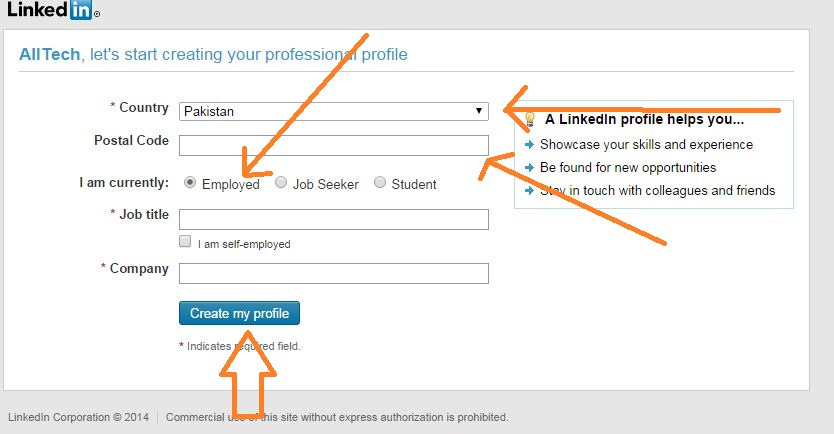
Step 4 :
Conform Your Account through your Email Address
Step 5 :
Login your G mail Account and Allow
Step 6 :
After your email Conform
Step 7 :
upload your Profile Picture and choose File
Edit your profile.
Add Specialties
Edit your qualifications
Add a Summary
Add Connections.
Add Websites
Get Recommendations
Add Applications
How to Create a Professional LinkedIn Profile
Why a Professional LinkedIn Profile Matters
LinkedIn is more than just a social network it’s a digital resume and networking hub.
- Make a strong first impression
- Attract recruiters and business connections
- Showcase your skills, experience, and expertise
Setting Up Your LinkedIn Profile
Choosing the Right Profile Picture
Your profile picture is the first thing people notice. Choose a professional, high-quality photo where you appear approachable and confident.
Adding a Compelling Headline
Your headline should grab attention. Instead of just your job title, highlight your expertise, industry, or unique value. Example: ✅ “SEO Specialist | Helping Businesses Rank #1 on Google” ❌ “Marketing Manager”
Crafting an Engaging Summary
Your summary is your elevator pitch. Keep it concise but impactful. Share who you are, what you do, and how you add value. Use keywords relevant to your industry to enhance visibility.
Optimizing Your Experience Section
- List relevant job experiences with clear descriptions
- Use bullet points to highlight achievements
- Add media (videos, links, or documents) to showcase your work
Highlighting Your Skills and Endorsements
LinkedIn allows you to add up to 50 skills. Prioritize top skills relevant to your industry and seek endorsements from colleagues to add credibility.
Getting Recommendations for Credibility
Ask former managers, colleagues, or clients to write recommendations. A few strong testimonials can make a significant impact on your profile’s credibility.
Customizing Your LinkedIn URL
Instead of a long, random LinkedIn URL, customize it to something clean and professional. Example: ✅ linkedin.com/in/YourName ❌ linkedin.com/in/john-smith-9483748
Showcasing Your Achievements and Projects
Use the “Featured” section to display:
- Portfolio work
- Published articles
- Key projects
Adding Certifications and Courses
If you’ve completed certifications or online courses, add them to your profile. Platforms like Coursera, Udemy, and LinkedIn Learning offer badges that can enhance credibility.
Engaging with LinkedIn Content
- Post insightful content related to your industry
- Share and comment on relevant posts
- Write articles to showcase thought leadership
Joining Relevant LinkedIn Groups
Being active in industry-related LinkedIn groups helps with networking and knowledge sharing. It also increases your profile visibility.
Networking and Connecting with Professionals
- Personalize connection requests
- Engage with your network’s posts
- Reach out to industry professionals for meaningful conversations
Keeping Your Profile Updated
Regularly update your profile with new experiences, achievements, and skills to keep it relevant and fresh.